Showing posts with label Samsung Patch Guide. Show all posts

New Patch For Samsung Star Control Music From Key

Hi, Friend Today I Upload A New Patch For Samsung Star With Very New Futures.
One of  This Is Control Music Via Three button Of Your Phone...WOW ...That's Interesting na...Yes You Get Right...!
Now We Can Control Music With Call,Back And End Key Of Samsung Star.
As Show In Above Picture. We Can Change Previous Track By Pressing Call Button, Next track By Pressing End Key, And Play/Pause By Pressing Back(Middle) Button.

*Note : Your Phone Must In A Lock Mode To Use This Future.

Tools Needed :
  1. New Patch Files (Apps_patch.bin  & tmf.rc2).
  2. MultiLoader.
  3. P.C.
  4. Your Phone.

Steps :
  1. First Download The Patch File And Other Files.
  2. Now Open MultiLoader And Select LSI6410 Checkbox.
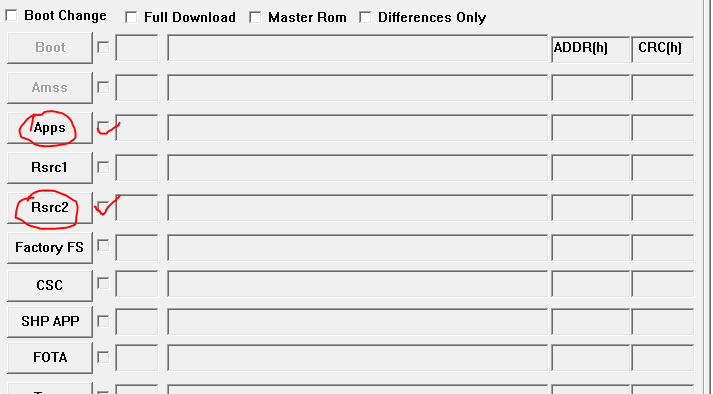
  3. Now Click On Apps Button And Locate Apps_patch.bin File.
  4. Click Rsrc2  And Locate tmf.rc2 File.
  5. Now Click Port Search. And Download Button.
  6. You Are Done.
  7. Now Restart Your Phone And Hold Down Lock Key To Enter In To Patch Menu.
  8. Select Music control Patch And Restart The Phone Again And Use It....!
*Note : Your Phone Must Flashed With MMGJK2 Firmware To Use This Patch.
-Click Here For Flashing Guide.

How To Patch The Samsung S5230/5233 Star

HI, Today I Will show You How To Patch Particular Firmware For Doing Different Functionality That ordinary Star Can't Provide, So lets Start...!

Tools Needed :
  1.  Multi loader With Guide By (www.TheMobiForest.com). 
  2. Patching Files.
  3. Samsung Star Phone With Flash.
  4. Windows O.S.
  5. Data Cable.
Steps :
  1.   Open Multi Loader And Select LSI As Shown In Figure Below...


    2 . Now UnZip All The Patch Files Which You have Download.
    3 . Put All The Files As Shown in Figure.
    4 . Now Click On Port Search And Then Download...After Few Seconds Your Phone Will Be Restarted.
    5 . To Open Patch Menu hold Down lock Key And Patch menu Will be Appeared  Choose Your Patch By Pressing Camera Button. Save Changes by Pressing Lock Button.
    6 . Enjoy Your New Patch And Theme.
    Download Links :
    1. MultiLoader V 5.64
    2. [MXEIL2] Patch.rc2 
    3. [MXEIL] + patch.rc2 + App.bin 
    4. [MMGJK2] + patch.rc2 + App.bin 
    *Note : Please Refer How To Flash S2530/5233 Flash Guide Before Patching This Firmware .(You Must Flash Your Phone Before Patching It).

     
    TheMobiForest - Ultimate Forest Of Technology © 2012-2014 | Designed by Cheap TVS, in collaboration with Vegan Breakfast, Royalty Free Images and Live Cricket Score